GCP Pub/Sub으로 구축하는 마이크로서비스 비동기 알림 시스템
마이크로서비스 아키텍처에서 동기식 HTTP 호출의 한계를 해결하기 위해 GCP Pub/Sub을 도입하여 비동기 알림 시스템을 구축했습니다. lms-service와 payment-service에서 notification-service로의 알림 전송을 Pub/Sub을 통해 처리하여 서비스 간 결합도를 낮추고 안정성을 높였습니다.
들어가며
“notification-service가 다운되면 결제도 안 되나요?”
이런 끔찍한 시나리오를 상상해보세요. 사용자가 결제를 완료했는데, notification-service가 일시적으로 다운되어 알림 전송이 실패하면서 결제 프로세스 전체가 실패하는 상황입니다. 결제는 성공했지만 사용자는 실패 메시지를 받게 되죠.
저는 여러 마이크로서비스가 각자의 비즈니스 로직을 수행하면서도, notification-service를 통해 이메일, 카카오 알림톡, 디스코드 메시지를 전송해야 하는 상황이었습니다. 처음에는 단순히 HTTP 호출로 처리하면 될 거라고 생각했습니다. 하지만 서비스 간 강한 결합, 느린 응답 시간, 그리고 한 서비스의 장애가 다른 서비스로 전파되는 문제들이 발생했습니다.
이번 글에서는 이런 문제들을 해결하기 위해 GCP Pub/Sub을 도입하여 비동기 알림 시스템을 구축한 과정을 공유합니다. 특히 “어떻게 하면 서비스 간 결합도를 낮추면서도, 안정적으로 알림을 전송할 수 있을까?”라는 질문에 대한 답을 찾아가는 여정을 담았습니다.
문제 상황: 동기식 HTTP 호출의 한계
기존 아키텍처의 문제점
처음에는 각 서비스에서 notification-service로 직접 HTTP 호출을 했습니다:
lms-service → HTTP POST → notification-service → 이메일 전송
payment-service → HTTP POST → notification-service → 카카오 알림톡 전송
이 방식의 문제점들:
1. 서비스 간 강한 결합
// lms-service에서 notification-service 직접 호출
@RestController
class TeacherController {
    @PostMapping("/teachers")
    fun createTeacher(@RequestBody request: CreateTeacherRequest) {
        // 1. 선생님 계정 생성
        val teacher = teacherService.create(request)

        // 2. notification-service 호출 (동기)
        val response = restTemplate.postForObject(
            "https://notification-service/api/v1/notifications/email",
            emailRequest
        )

        // 3. 응답 대기... (느림)
        // 4. notification-service 다운 시? → 전체 실패
    }
}
2. 느린 응답 시간
- 이메일 전송: 1-3초
- 카카오 알림톡: 2-5초
- 사용자는 계정 생성 완료를 기다려야 함
3. 장애 전파
notification-service 다운
  ↓
lms-service의 선생님 계정 생성 실패
  ↓
사용자는 계정을 만들 수 없음
4. 확장성 문제
- notification-service가 병목이 됨
- 여러 서비스가 동시에 호출하면 부하 증가
- 처리 속도 저하
해결책: GCP Pub/Sub 도입
Pub/Sub이란?
GCP Pub/Sub은 Google Cloud의 완전 관리형 메시지 큐 서비스입니다. Publisher가 메시지를 발행하면, Subscriber가 구독하여 처리하는 비동기 메시징 패턴을 제공합니다.
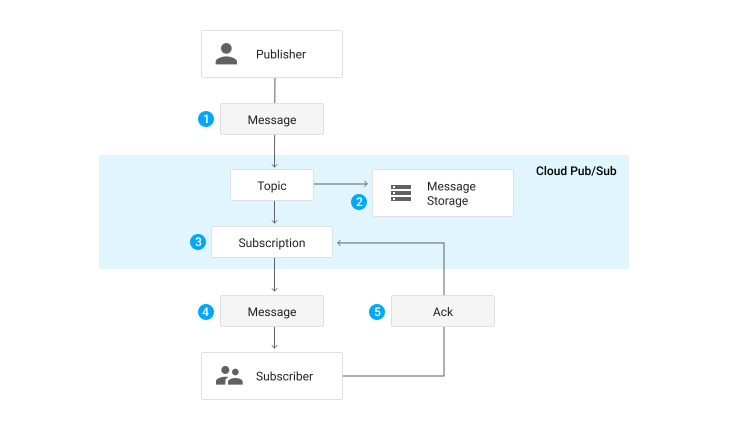
핵심 개념:
- Topic: 메시지가 발행되는 주제
- Subscription: Topic을 구독하는 구독자
- Publisher: 메시지를 발행하는 서비스
- Subscriber: 메시지를 구독하여 처리하는 서비스
위 다이어그램에서 볼 수 있듯이, Publisher가 Topic에 메시지를 발행하면, 해당 Topic을 구독하는 Subscription을 통해 Subscriber가 메시지를 받아 처리합니다. 하나의 Topic에 여러 Subscription을 만들 수 있어, 같은 메시지를 여러 서비스에서 처리할 수도 있습니다.
새로운 아키텍처
lms-service → Pub/Sub Topic → notification-service → 이메일 전송
payment-service → Pub/Sub Topic → notification-service → 카카오 알림톡 전송
변화:
- 비동기 처리: 발행 후 즉시 반환
- 장애 격리: notification-service 다운되어도 다른 서비스 영향 없음
- 자동 재시도: Pub/Sub이 실패한 메시지 자동 재시도
- 확장성: 여러 서비스가 동시에 메시지 발행 가능
전체 서비스 아키텍처
저희 s-class 프로젝트는 여러 마이크로서비스로 구성되어 있습니다:
graph TB
    subgraph "프론트엔드"
        FE[Frontend<br/>React/Next.js]
    end

    subgraph "API Gateway"
        GW[API Gateway<br/>Nginx]
    end

    subgraph "인증/인가 서비스"
        AUTH[Auth Service<br/>JWT 발급]
        ACCOUNT[Account Service<br/>사용자 관리]
    end

    subgraph "비즈니스 서비스"
        LMS[LMS Service<br/>학습 관리]
        PAYMENT[Payment Service<br/>결제 처리]
        SUPPORTERS[Supporters Service<br/>서포터즈]
        FORMO[Formo Service<br/>폼 빌더]
    end

    subgraph "GCP Pub/Sub"
        EMAIL_TOPIC[email-requests Topic]
        KAKAO_TOPIC[kakao-requests Topic]
        DISCORD_TOPIC[discord-requests Topic]
    end

    subgraph "알림 서비스"
        NOTIFICATION[Notification Service<br/>알림 전송]
        EMAIL_SUB[Email Subscription]
        KAKAO_SUB[Kakao Subscription]
        DISCORD_SUB[Discord Subscription]
    end

    subgraph "외부 서비스"
        GMAIL[Gmail SMTP]
        KAKAO_API[Kakao 알림톡 API]
        DISCORD_WEBHOOK[Discord Webhook]
    end

    FE --> GW
    GW --> AUTH
    GW --> ACCOUNT
    GW --> LMS
    GW --> PAYMENT
    GW --> SUPPORTERS
    GW --> FORMO

    LMS --> ACCOUNT
    PAYMENT --> ACCOUNT

    LMS -->|Pub/Sub Publish| EMAIL_TOPIC
    LMS -->|Pub/Sub Publish| KAKAO_TOPIC
    LMS -->|Pub/Sub Publish| DISCORD_TOPIC

    PAYMENT -->|Pub/Sub Publish| EMAIL_TOPIC
    PAYMENT -->|Pub/Sub Publish| KAKAO_TOPIC
    PAYMENT -->|Pub/Sub Publish| DISCORD_TOPIC

    EMAIL_TOPIC --> EMAIL_SUB
    KAKAO_TOPIC --> KAKAO_SUB
    DISCORD_TOPIC --> DISCORD_SUB

    EMAIL_SUB --> NOTIFICATION
    KAKAO_SUB --> NOTIFICATION
    DISCORD_SUB --> NOTIFICATION

    NOTIFICATION --> GMAIL
    NOTIFICATION --> KAKAO_API
    NOTIFICATION --> DISCORD_WEBHOOK

    style LMS fill:#e1f5ff
    style PAYMENT fill:#e1f5ff
    style NOTIFICATION fill:#fff4e1
    style EMAIL_TOPIC fill:#ffe1f5
    style KAKAO_TOPIC fill:#ffe1f5
    style DISCORD_TOPIC fill:#ffe1f5
서비스별 역할
Publisher (발행 서비스):
lms-service: 선생님 계정 생성 시 이메일 전송payment-service: 결제 성공/실패 알림 (이메일, 카카오, 디스코드)
Subscriber (구독 서비스):
notification-service: 모든 알림 채널 처리- EmailNotificationSubscriber
- KakaoNotificationSubscriber
- DiscordNotificationSubscriber
Topic 분리 전략:
- 채널별 Topic 분리 (email, kakao, discord)
- 여러 서비스가 동일 Topic에 발행 가능
sourceService필드로 발행 서비스 추적
구현 상세: Publisher 구현
NotificationPublisher 구현
모든 Publisher 서비스에서 공통으로 사용하는 NotificationPublisher를 구현했습니다:
@Component
class NotificationPublisher(
    private val pubSubTemplate: PubSubTemplate,
    private val objectMapper: ObjectMapper,
    private val topicConfig: NotificationTopicConfig,
) {
    private val logger: Logger = LoggerFactory.getLogger(NotificationPublisher::class.java)

    fun publishNotification(request: NotificationRequest) {
        try {
            val topicName = getTopicForChannel(request.channel)
            val message = objectMapper.writeValueAsString(request)

            pubSubTemplate.publish(topicName, message)
            logger.info("Successfully published notification to topic: $topicName, notificationId: ${request.notificationId}")
        } catch (e: Exception) {
            logger.error("Failed to publish notification: notificationId=${request.notificationId}", e)
            throw e
        }
    }

    private fun getTopicForChannel(channel: NotificationChannel): String {
        return when (channel) {
            NotificationChannel.KAKAO -> topicConfig.kakao
            NotificationChannel.EMAIL -> topicConfig.email
            NotificationChannel.DISCORD -> topicConfig.discord
        }
    }
}
NotificationRequest 메시지 포맷
모든 서비스에서 공통으로 사용하는 메시지 포맷:
data class NotificationRequest(
    @field:JsonProperty("notificationId")
    val notificationId: String,  // ULID

    @field:JsonProperty("channel")
    val channel: NotificationChannel,  // EMAIL, KAKAO, DISCORD

    @field:JsonProperty("recipient")
    val recipient: NotificationRecipient,  // 채널별 수신자 정보

    @field:JsonProperty("content")
    val content: NotificationContent,  // 템플릿 또는 직접 내용

    @field:JsonProperty("purpose")
    val purpose: String = "LMS",  // 알림 목적

    @field:JsonProperty("priority")
    val priority: String = "HIGH",  // 우선순위

    @field:JsonProperty("sourceService")
    val sourceService: String,  // 발행 서비스 (lms-service, payment-service)

    @field:JsonProperty("userId")
    val userId: String? = null,

    @field:JsonProperty("correlationId")
    val correlationId: String? = null,  // 관련 ID (결제 ID 등)

    @field:JsonProperty("retryCount")
    val retryCount: Int = 0,

    @field:JsonProperty("maxRetries")
    val maxRetries: Int = 3,
)
실제 사용 예시: LMS Service
선생님 계정 생성 시 이메일 전송:
@Component
class EmailServiceImpl(
    private val notificationPublisher: NotificationPublisher,
) : EmailService {

    override fun sendTeacherAccountPassword(
        email: String,
        name: String,
        password: String,
        organizationName: String,
        loginUrl: String,
    ) {
        try {
            val request = NotificationRequest(
                notificationId = UlidCreator.getUlid().toString(),
                channel = NotificationChannel.EMAIL,
                recipient = NotificationRecipient.EmailRecipient(
                    email = email,
                    emailName = name,
                ),
                content = NotificationContent.Template(
                    templateId = "teacher_account_creation",
                    parameters = mapOf(
                        "name" to name,
                        "email" to email,
                        "password" to password,
                        "organizationName" to organizationName,
                        "loginUrl" to loginUrl,
                    ),
                ),
                purpose = "TEACHER_ACCOUNT_CREATION",
                priority = "HIGH",
                sourceService = "lms-service",
            )

            notificationPublisher.publishNotification(request)
            // 즉시 반환! 이메일 전송 완료를 기다리지 않음
        } catch (e: Exception) {
            logger.error("Failed to publish email notification: $email", e)
            // 이메일 전송 실패해도 계정 생성은 성공으로 처리
        }
    }
}
실제 사용 예시: Payment Service
결제 성공 시 알림 전송:
@Service
class NotificationService(
    private val notificationPublisher: NotificationPublisher,
    private val accountServiceClient: AccountServiceClientImpl,
) {
    private val sourceService = "payment-service"

    @Async
    fun sendPaymentSuccessNotification(payment: Payment) {
        // 사용자 정보 조회
        val userInfo = accountServiceClient.getUserInfo(payment.userId) ?: return

        // 전화번호가 있으면 카카오, 없으면 이메일
        val (channel, recipient) = when {
            !userInfo.phoneNumber.isNullOrBlank() -> {
                NotificationChannel.KAKAO to NotificationRecipient.KakaoRecipient(
                    phoneNumber = userInfo.phoneNumber,
                    userId = payment.userId,
                )
            }
            else -> {
                NotificationChannel.EMAIL to NotificationRecipient.EmailRecipient(
                    email = userInfo.email,
                    emailName = userInfo.name,
                    userId = payment.userId,
                )
            }
        }

        val request = NotificationRequest(
            notificationId = UlidCreator.getUlid().toString(),
            channel = channel,
            recipient = recipient,
            content = NotificationContent.Template(
                templateId = "payment_success",
                parameters = mapOf(
                    "amount" to "${payment.amount}",
                    "description" to getPaymentDescription(payment),
                    "orderId" to payment.id,
                ),
            ),
            purpose = "PAYMENT",
            priority = "HIGH",
            sourceService = sourceService,
            userId = payment.userId,
            correlationId = payment.id,
        )

        notificationPublisher.publishNotification(request)

        // 디스코드 알림도 별도로 발행
        sendDiscordSuccessNotification(payment)
    }
}
구현 상세: Subscriber 구현
BaseNotificationSubscriber
모든 구독자의 공통 로직을 추상화한 기본 클래스:
abstract class BaseNotificationSubscriber(
    protected val pubSubTemplate: PubSubTemplate,
    protected val objectMapper: ObjectMapper,
    protected val processNotificationUseCase: ProcessNotificationUseCase
) {
    protected val logger: Logger = LoggerFactory.getLogger(javaClass)

    abstract fun getSubscriptionName(): String
    abstract fun getChannelName(): String

    @Bean
    abstract fun inputChannel(): MessageChannel

    @Bean
    abstract fun inboundChannelAdapter(): PubSubInboundChannelAdapter

    protected fun createMessageHandler(): MessageHandler {
        return MessageHandler { message ->
            var ackMessage: BasicAcknowledgeablePubsubMessage? = null

            try {
                // ACK 가능한 메시지 추출
                ackMessage = message.headers[GcpPubSubHeaders.ORIGINAL_MESSAGE]
                    as? BasicAcknowledgeablePubsubMessage

                // 메시지 파싱
                val payloadString = when (val payload = message.payload) {
                    is String -> payload
                    is BasicAcknowledgeablePubsubMessage ->
                        payload.pubsubMessage.data.toStringUtf8()
                    else -> throw IllegalStateException("Unsupported message type")
                }

                val request = objectMapper.readValue(
                    payloadString,
                    NotificationRequest::class.java
                )

                logger.info("${getChannelName()} 알림 수신: notificationId=${request.notificationId}")

                // 알림 처리
                processNotificationUseCase.process(request)

                // 성공 시 ACK
                ackMessage?.ack()
                logger.debug("${getChannelName()} 알림 처리 완료: notificationId=${request.notificationId}")
            } catch (e: Exception) {
                logger.error("${getChannelName()} 알림 처리 실패", e)
                // 실패 시 NACK (재시도 가능)
                ackMessage?.nack()
            }
        }
    }
}
EmailNotificationSubscriber 구현
@Configuration
class EmailNotificationSubscriber(
    pubSubTemplate: PubSubTemplate,
    objectMapper: ObjectMapper,
    processNotificationUseCase: ProcessNotificationUseCase,
    private val subscriptionConfig: NotificationSubscriptionConfig,
) : BaseNotificationSubscriber(pubSubTemplate, objectMapper, processNotificationUseCase) {

    override fun getSubscriptionName(): String = subscriptionConfig.email
    override fun getChannelName(): String = "email"

    @Bean("emailInputChannel")
    override fun inputChannel(): MessageChannel = DirectChannel()

    @Bean("emailInboundChannelAdapter")
    override fun inboundChannelAdapter(): PubSubInboundChannelAdapter {
        val subscriptionName = getSubscriptionName()

        val adapter = PubSubInboundChannelAdapter(
            pubSubTemplate,
            subscriptionName
        )
        adapter.outputChannel = inputChannel()
        adapter.ackMode = AckMode.MANUAL  // 수동 ACK 모드

        logger.info("EmailNotificationSubscriber 초기화 완료: subscription=$subscriptionName")
        return adapter
    }

    @Bean("emailMessageHandler")
    @ServiceActivator(inputChannel = "emailInputChannel")
    fun messageHandler(): MessageHandler {
        return createMessageHandler()
    }
}
KakaoNotificationSubscriber, DiscordNotificationSubscriber
동일한 패턴으로 구현:
@Configuration
class KakaoNotificationSubscriber(...) : BaseNotificationSubscriber(...) {
    override fun getSubscriptionName(): String = subscriptionConfig.kakao
    override fun getChannelName(): String = "kakao"
    // ... 동일한 구조
}

@Configuration
class DiscordNotificationSubscriber(...) : BaseNotificationSubscriber(...) {
    override fun getSubscriptionName(): String = subscriptionConfig.discord
    override fun getChannelName(): String = "discord"
    // ... 동일한 구조
}
Before & After 비교
Before: 동기식 HTTP 호출
// lms-service
@PostMapping("/teachers")
fun createTeacher(@RequestBody request: CreateTeacherRequest) {
    // 1. 계정 생성
    val teacher = teacherService.create(request)

    // 2. notification-service 직접 호출 (동기)
    try {
        val response = restTemplate.postForObject(
            "https://notification-service/api/v1/notifications/email",
            emailRequest,
            EmailResponse::class.java
        )
        // 응답 대기 중... (1-3초)
    } catch (e: Exception) {
        // notification-service 다운 시?
        // → 전체 트랜잭션 실패
        throw RuntimeException("이메일 전송 실패", e)
    }

    return teacher
}
문제점:
- 느린 응답 시간 (1-3초 대기)
- notification-service 다운 시 전체 실패
- 서비스 간 강한 결합
- 확장성 문제
After: 비동기 Pub/Sub
// lms-service
@PostMapping("/teachers")
fun createTeacher(@RequestBody request: CreateTeacherRequest) {
    // 1. 계정 생성
    val teacher = teacherService.create(request)

    // 2. Pub/Sub으로 메시지 발행 (비동기)
    try {
        notificationPublisher.publishNotification(emailRequest)
        // 즉시 반환! (수십 밀리초)
    } catch (e: Exception) {
        // Pub/Sub 발행 실패해도 계정 생성은 성공
        logger.error("알림 발행 실패 (계정은 생성됨)", e)
    }

    return teacher  // 빠른 응답!
}
개선점:
- 빠른 응답 시간 (수십 밀리초)
- notification-service 다운되어도 영향 없음
- 서비스 간 약한 결합
- 확장성 향상
메시지 흐름 상세
GCP Pub/Sub의 기본 동작 방식을 이해하면, 우리가 구현한 시스템의 동작도 더 명확해집니다:
위 다이어그램은 Pub/Sub의 핵심 동작 방식을 보여줍니다:
- Publisher가 Topic에 메시지 발행
- Topic이 메시지를 저장
- Subscription이 Topic을 구독하여 메시지 수신
- Subscriber가 메시지 처리 후 ACK
전체 메시지 흐름
sequenceDiagram
    participant User
    participant LMS as LMS Service
    participant PS as Pub/Sub Topic
    participant NS as Notification Service
    participant SMTP as Gmail SMTP

    User->>LMS: 선생님 계정 생성 요청
    LMS->>LMS: 계정 생성 (DB 저장)
    LMS->>PS: 이메일 알림 메시지 발행
    PS-->>LMS: 발행 완료 (즉시 반환)
    LMS-->>User: 계정 생성 완료 (빠른 응답)

    Note over PS,NS: 비동기 처리
    PS->>NS: 메시지 전달
    NS->>NS: 메시지 파싱 및 검증
    NS->>SMTP: 이메일 전송
    SMTP-->>NS: 전송 완료
    NS->>PS: ACK (메시지 처리 완료)
에러 처리 및 재시도
flowchart TD
    A[메시지 발행] --> B{발행 성공?}
    B -->|Yes| C[즉시 반환]
    B -->|No| D[에러 로깅]
    D --> E[계정 생성은 성공 처리]

    F[메시지 수신] --> G{처리 성공?}
    G -->|Yes| H[ACK - 메시지 삭제]
    G -->|No| I[NACK - 재시도]
    I --> J{재시도 횟수 초과?}
    J -->|No| K[Pub/Sub 자동 재시도]
    J -->|Yes| L[Dead Letter Queue]

    style C fill:#e1ffe1
    style H fill:#e1ffe1
    style L fill:#ffe1e1
설정 및 구성
Spring Cloud GCP Pub/Sub 설정
build.gradle.kts:
dependencies {
    // Google Cloud Pub/Sub
    implementation("com.google.cloud:spring-cloud-gcp-starter-pubsub")
}
application.properties:
# GCP 프로젝트 설정
spring.cloud.gcp.project-id=${GCP_PROJECT_ID:gen-lang-client-0030222646}
spring.cloud.gcp.pubsub.enabled=true

# Topic 설정 (Publisher)
app.notification.topics.kakao=${NOTIFICATION_TOPIC_KAKAO:dev-notification-kakao-requests}
app.notification.topics.email=${NOTIFICATION_TOPIC_EMAIL:dev-notification-email-requests}
app.notification.topics.discord=${NOTIFICATION_TOPIC_DISCORD:dev-notification-discord-requests}

# Subscription 설정 (Subscriber)
app.notification.subscriptions.kakao=dev-notification-kakao-requests-sub-app
app.notification.subscriptions.email=dev-notification-email-requests-sub-app
app.notification.subscriptions.discord=dev-notification-discord-requests-sub-app
Topic 및 Subscription 생성
GCP Console에서 Topic과 Subscription을 생성합니다:
Topic 생성:
dev-notification-email-requestsdev-notification-kakao-requestsdev-notification-discord-requests
Subscription 생성:
- 각 Topic에 대해 Subscription 생성
dev-notification-email-requests-sub-appdev-notification-kakao-requests-sub-appdev-notification-discord-requests-sub-app
Subscription 설정:
- Ack Deadline: 60초 (기본값)
- Message Retention: 7일
- Dead Letter Topic: 실패한 메시지 저장용 (선택)
실제 사용 사례
사례 1: 선생님 계정 생성 (LMS Service)
시나리오:
- 관리자가 새로운 선생님 계정을 생성
- 생성된 계정 정보를 이메일로 전송
Before (동기식):
사용자 요청 → 계정 생성 (0.5초) → 이메일 전송 대기 (2초) → 응답
총 소요 시간: 2.5초
After (비동기):
사용자 요청 → 계정 생성 (0.5초) → 메시지 발행 (0.05초) → 응답
총 소요 시간: 0.55초 (약 80% 개선!)
사례 2: 결제 성공 알림 (Payment Service)
시나리오:
- 사용자가 결제 완료
- 결제 성공 알림을 카카오 알림톡으로 전송
- 동시에 디스코드 채널에도 알림
구현:
@Async
fun sendPaymentSuccessNotification(payment: Payment) {
    // 1. 사용자에게 알림 (카카오 또는 이메일)
    sendUserNotification(payment)

    // 2. 디스코드 채널에 알림 (별도 메시지)
    sendDiscordSuccessNotification(payment)
}
장점:
- 두 알림이 독립적으로 처리됨
- 하나가 실패해도 다른 하나는 성공
- 비동기 처리로 결제 프로세스에 영향 없음
장점과 개선 효과
1. 서비스 간 결합도 감소
Before:
- lms-service가 notification-service의 존재를 직접 알고 있음
- notification-service API 변경 시 lms-service도 수정 필요
After:
- lms-service는 Pub/Sub Topic만 알면 됨
- notification-service 변경이 lms-service에 영향 없음
- 느슨한 결합 (Loose Coupling)
2. 장애 격리
Before:
notification-service 다운
  ↓
lms-service의 선생님 계정 생성 실패
  ↓
사용자는 계정을 만들 수 없음
After:
notification-service 다운
  ↓
메시지는 Pub/Sub에 저장됨
  ↓
lms-service는 정상 동작
  ↓
notification-service 복구 시 자동으로 처리
3. 성능 개선
응답 시간 비교:
| 작업 | Before (동기) | After (비동기) | 개선율 |
|---|---|---|---|
| 선생님 계정 생성 | 2.5초 | 0.55초 | 78% ↓ |
| 결제 완료 | 3.0초 | 0.6초 | 80% ↓ |
4. 확장성 향상
Before:
- notification-service가 모든 요청을 순차 처리
- 동시 요청 증가 시 병목 발생
After:
- Pub/Sub이 메시지 버퍼링
- notification-service가 자신의 처리 속도에 맞춰 처리
- 여러 notification-service 인스턴스로 확장 가능
5. 자동 재시도
Pub/Sub은 실패한 메시지를 자동으로 재시도합니다:
- Ack Deadline: 60초 내 ACK가 없으면 재전송
- Max Retries: 설정 가능한 최대 재시도 횟수
- Dead Letter Queue: 최대 재시도 후에도 실패하면 DLQ로 이동
주의사항 및 모범 사례
1. 메시지 순서 보장
Pub/Sub은 기본적으로 메시지 순서를 보장하지 않습니다. 순서가 중요한 경우:
- Ordering Key 사용: 같은 ordering key를 가진 메시지는 순서 보장
- 단일 Subscription: 여러 Subscription이 있으면 순서 보장 불가
2. 멱등성 (Idempotency) 보장
같은 메시지가 여러 번 처리될 수 있으므로, 멱등성을 보장해야 합니다:
// notificationId로 중복 처리 방지
fun processNotification(request: NotificationRequest) {
    // 이미 처리된 알림인지 확인
    if (notificationRepository.existsByNotificationId(request.notificationId)) {
        logger.warn("이미 처리된 알림: ${request.notificationId}")
        return
    }

    // 알림 처리
    sendEmail(request)

    // 처리 완료 기록
    notificationRepository.save(Notification(request.notificationId, ...))
}
3. 메시지 크기 제한
Pub/Sub은 메시지 크기를 10MB로 제한합니다:
- 큰 데이터는 GCS에 저장하고 URL만 전달
- 메시지에는 메타데이터만 포함
4. 모니터링 및 알림
모니터링 지표:
- 발행된 메시지 수
- 처리된 메시지 수
- 실패한 메시지 수
- 메시지 지연 시간
- Dead Letter Queue 크기
알림 설정:
- Dead Letter Queue에 메시지 쌓일 때
- 처리 지연 시간이 임계값 초과 시
- 에러율이 높을 때
비용 고려사항
GCP Pub/Sub 비용 구조:
- 무료 할당량: 월 10GB 메시지
- 초과 시: $40/TB
- Subscription: 무료
예상 비용 (월 100만 건 알림):
- 평균 메시지 크기: 1KB
- 총 메시지 크기: 1GB
- 비용: 무료 (할당량 내)
결론
GCP Pub/Sub을 도입하여 비동기 알림 시스템을 구축하면서 얻은 것들:
달성한 목표
-
서비스 간 결합도 감소
- 느슨한 결합으로 서비스 독립성 확보
- 서비스별 독립적 배포 및 확장 가능
-
안정성 향상
- 장애 격리로 한 서비스의 문제가 다른 서비스로 전파되지 않음
- 자동 재시도로 일시적 오류 복구
-
성능 개선
- 응답 시간 80% 개선
- 사용자 경험 향상
-
확장성 확보
- Pub/Sub이 메시지 버퍼링
- 서비스별 독립적 스케일링 가능
배운 교훈
“비동기 처리는 성능뿐만 아니라 안정성도 향상시킨다”
처음에는 성능 개선만 기대했지만, 실제로는 서비스 간 결합도 감소와 장애 격리 효과가 더 컸습니다. 특히 notification-service가 일시적으로 다운되어도 다른 서비스들이 정상 동작하는 것을 보면서, 비동기 메시징의 가치를 확실히 느낄 수 있었습니다.
“적절한 추상화가 코드 재사용성을 높인다”
BaseNotificationSubscriber를 통해 공통 로직을 추상화하고, 각 채널별 Subscriber는 최소한의 코드만 작성하도록 설계했습니다. 이로 인해 새로운 채널 추가가 매우 간단해졌습니다.
다음 단계
현재 구조로도 충분히 안정적이고 효율적이지만, 더 나아가려면:
- Dead Letter Queue 모니터링 강화: 실패한 메시지 자동 분석 및 알림
- 메시지 순서 보장: Ordering Key 활용하여 순서가 중요한 알림 처리
- 배치 처리: 여러 알림을 묶어서 처리하여 효율성 향상
- 메시지 스키마 버전 관리: 스키마 변경 시 하위 호환성 유지